ShopDreamUp AI ArtDreamUp
Deviation Actions








Description

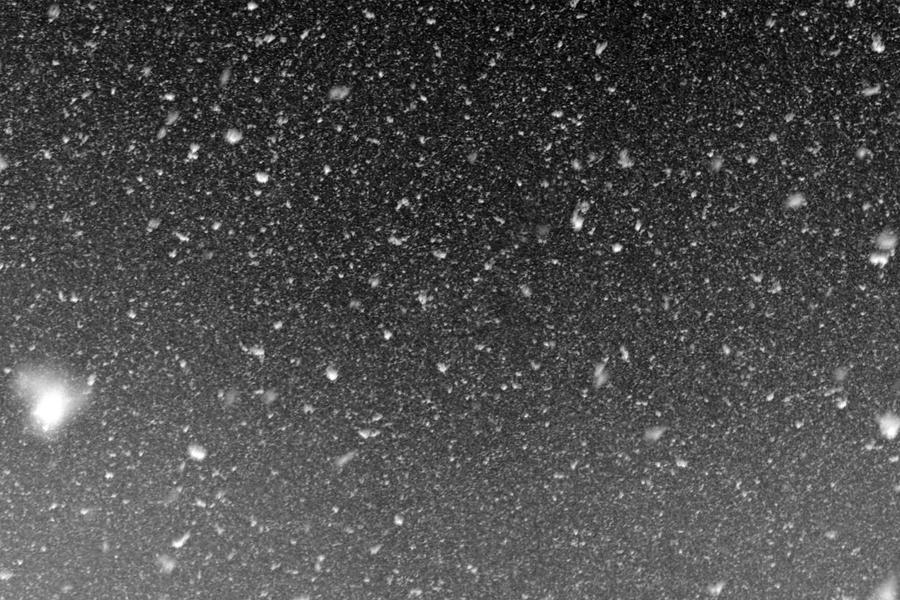
This is a single texture of the "Snow Texture Pack by Moosplauze" with six photos of snow falling down. All files are in original size of 5184 x 3456 Pixels each (18 Megapixels). This way you do not need to enlarge this if using on big photos.
Snow Texture Pack by Moosplauze you can download the full pack as a .zip file, to download any individual texture follow these links (if I ever get a premium membership I will post thumbs here, so you get a better overview):
Snow Texture I 5184 x 3456 Pixels
Snow Texture II 5184 x 3456 Pixels
Snow Texture III 5184 x 3456 Pixels
Snow Texture IV 5184 x 3456 Pixels
Snow Texture V 5184 x 3456 Pixels
Snow Texture VI 5184 x 3456 Pixels
This Texture is free to download and use for anyone, all you must do is
 this if you use it, put a link to this Texture or to this Texture Pack into your images description and post me a link of your work in my comments, so that I can in return your work!
If you are unsure how to use this in Photoshop, follow this guideline:
Create a new layer and paste this texture onto that layer You can then set the layer blending mode to any desired setting like screen or soft light Set the opacity to the desired level If you want the snowfall only to be visible in the sky use a layer mask with gradual fill. Of course you can crop this texture if you don't want certain parts of it to show in your imageI hope that these textures are of good use to some people here!

Image size
5184x3456px 10.75 MB
Make
Canon
Model
Canon EOS 600D
Shutter Speed
1/197 second
Aperture
F/9.0
Focal Length
55 mm
ISO Speed
400
Date Taken
Dec 10, 2011, 11:15:47 AM
Sensor Size
22mm
Comments16
Join the community to add your comment. Already a deviant? Log In
Used this beautiful texture here, thank you so much!!
:origin()/pre00/d2fd/th/pre/f/2018/050/5/0/only_the_wild_ones_by_lovelyskylark-dc3ph7j.png)